Previews
Concept models of all 20 mechanisms, as rotatable 3D files and rendered images.
| Folder | Contents |
|---|---|
models/ |
One coloured .glb and one .usdz per mechanism. USDZ opens in 3D with Quick Look on macOS and iOS; for the GLB use the gallery or any glTF viewer. |
gallery.html |
three.js viewer for all 20 models, online at latches.nclr.eu/gallery |
images/ |
1600 × 1350 captioned render per mechanism, plus screenshots of the cam lever force page and the latch 8 spring explorer |
thumbs/ |
200 × 150 thumbnails used in the ranking tables |
overview.png |
All 20 renders on one sheet, in force-rank order |
cam-lever-forces.html |
Interactive side cut of the cam lever: lift the lever and see the spring force, seal squeeze and lever push. Online at latches.nclr.eu; open the file in a browser for a local copy. |
latch8-spring-explorer.html |
Latch 8's spring and seal: drag the spring rate, nut setting, seal load, stops, seal set and slack, and see the latch force, seal pressure and work to close. Online at latches.nclr.eu; open the file in a browser for a local copy. |
animations/ |
Videos of the five strongest latches opening and closing (cam lever, swing bolt, captive screw, lift-and-turn, over-centre draw latch), with live clamp force and seal squeeze. The .jpg next to each is its poster frame. |
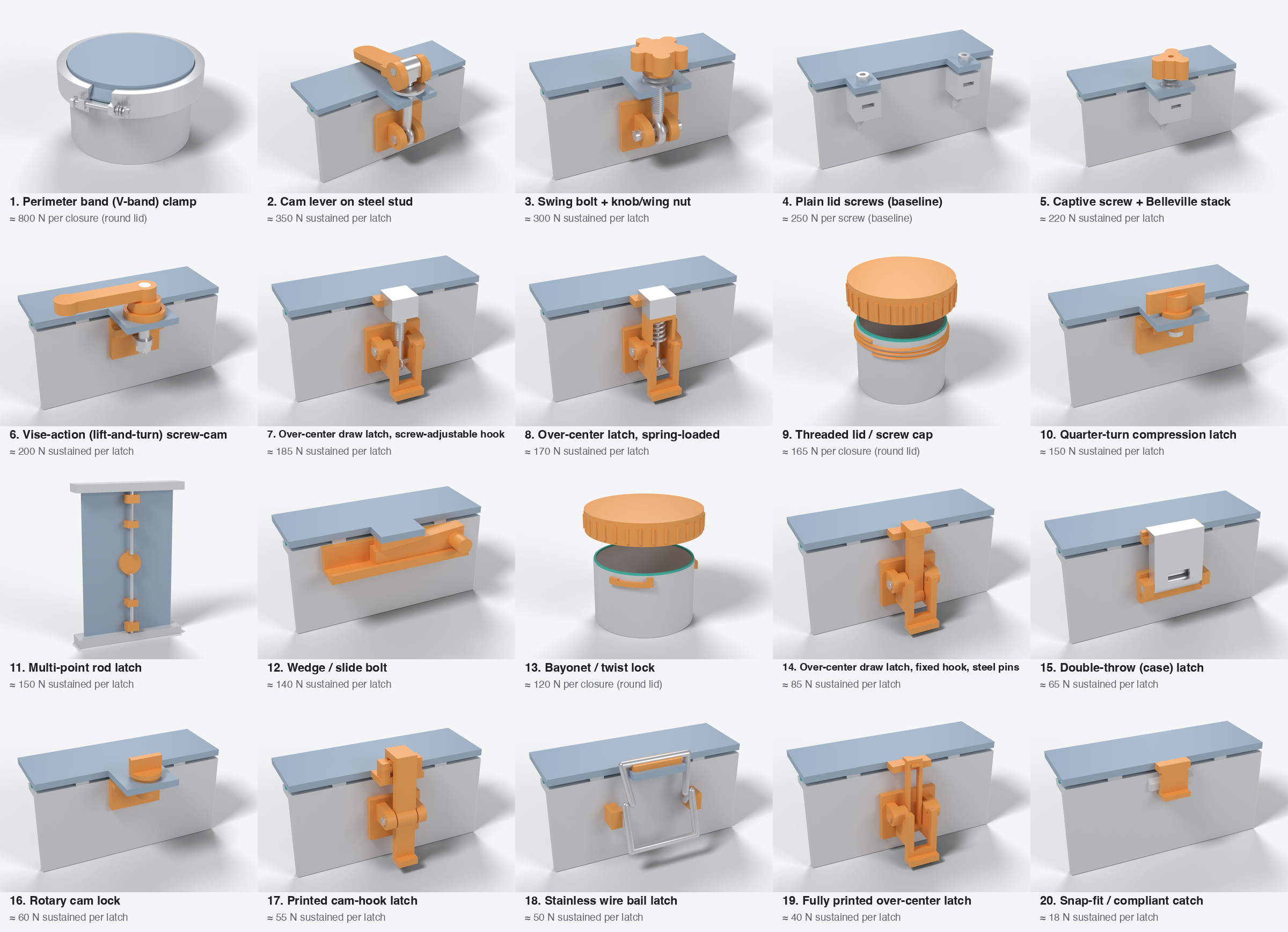
These are illustrations, not print-ready parts. They are at real millimetre scale with plausible proportions from the analysis (pin sizes, lid tab, Belleville stacks, 1.6 mm compressed TPU rib), but they have no clearances, fits or print orientation worked out.
Colours: orange = printed latch parts, grey = box, blue-grey = lid, silver = stainless steel (including the M3 square nuts), teal = TPU 85A seal.
Regenerating
Requires FreeCAD 1.x and Blender 4.2 or newer. From the repo root:
previews/make_previews.sh                       # everything
previews/make_previews.sh cam-lever-steel-stud  # just one mechanism
The pipeline:
build_models.pyruns in FreeCAD's headlessfreecadcmd. First, withCHECK=1, it runs an interference check: the build stops if any two parts overlap by more than 0.5 mm³. That catches a pin without a bore or a nut buried in a gusset. It then builds every part with the Part workbench and writes STL meshes plus a manifest topreviews/_build/(git-ignored).render.pyruns in Blender (blender -b). It assigns materials, exports the.glband.usdz, and renders each model with Cycles.EXPORT_ONLY=1skips the renders.annotate.pyuses Pillow. It crops and captions the renders, makes the thumbnails and the overview sheet.animate.py(Blender) rigs each of the five latches on its pins and keys every moving part from the latch's own kinematics: the cam, the knob's thread pitch, the hub's ramp, the over-centre linkage. One seal model drives the TPU rib squeeze and the clamp force for all five. The script exports the animated.glband renders the frames with Eevee.CHECK=1instead lists any parts that run into each other while moving (every 5th frame).annotate_video.pycaptions the frames and encodes the MP4s with ffmpeg.build_gallery.pywritesgallery.htmlwith the mechanism data embedded.../scripts/build_docs.pyregenerates the docs, which embed the images.
To change a model, edit its m_<name>() function in build_models.py. Rectangular-lid scenes share rect_context(), the wall, rib and lid section; the four over-center draw latches share oc_draw_latch().